
Tasks & Rewards
Learn what your device does, how different Unetwork tasks work, and what can affect your daily UP rewards.


How Rewards Work
Unetwork rewards are based on real network activity, not fixed daily payments.
Think of your device as a worker on the network. The more available, compatible and useful it is, the more opportunities it has to complete tasks and earn UP rewards.
As the network continues to grow, new tasks are being introduced and existing tasks continue to expand. Your daily UP rewards can vary depending on several factors, including:
Please Note
UP rewards are influenced by a combination of the factors explained above and are not guaranteed. Any examples shown on this page are based on current information or community observations and are provided as guidance only. Task availability, eligibility and reward amounts may change as Unetwork develops.
📶 Device Uptime — How consistently your device remains connected to the network.
The longer your device stays online, the higher your uptime percentage becomes. Higher uptime gives your device more opportunities to participate in network tasks and earn UP rewards.
Aim for: 95%+ uptime
📱 Device type - Different devices have different capabilities.
Different phone models contain different hardware, sensors, security features and capabilities. As new tasks are introduced, some devices may qualify for more opportunities than others. As the network continues to grow, new tasks may be introduced and existing tasks may expand. Your daily UP rewards can vary depending on several factors, including:
🌍 Location -Some tasks are only available in certain countries.
Some tasks are introduced gradually and may only be available in certain countries or regions. As Unetwork expands, additional tasks and earning opportunities may become available in more locations.
📡 Connection - Wi-Fi and mobile data both have their advantages.
Some tasks only require a stable internet connection, while others may require or benefit from an active SIM card or mobile-data connection. Different connection types may qualify your device for different tasks.
⚙️ Tasks — More available tasks can create more earning opportunities.
Unetwork is continuously introducing new tasks. As additional services launch, your device may be able to participate in more activities and earn additional UP rewards.
📈 Network Demand - Rewards are driven by real network demand.
As more businesses and services use Unetwork, additional work may become available for compatible participating devices. Earning opportunities can grow as genuine network demand and commercial adoption expand.
Current Tasks
Understanding Unetwork Tasks
UP rewards within the Unetwork ecosystem are generated through eligible participation in network tasks and activities.
Some tasks run automatically in the background once your device has been configured correctly. These are known as Passive Tasks.
Other tasks require you to actively enrol, enable participation or complete an additional setup process. These are known as Opt-In Tasks.
As the Unetwork ecosystem develops, new tasks may be introduced and existing opportunities may expand, creating additional ways for eligible devices and participants to earn rewards.
Passive Tasks
These tasks can run automatically once your device is connected, configured correctly and eligible to participate.
Examples include:
Opt-In Tasks
These tasks require you to actively enrol, enable participation or follow additional instructions before taking part.
Examples include:
Task availability varies. Not every task will be available to every participant or device. Eligibility may depend on your location, device, connection type, SIM requirements and current network demand.
📡 Telemetry
What is Telemetry?
Telemetry is the process of collecting real-world network data from your device while it is connected to the internet.
Instead of relying on estimates or simulations, Unetwork gathers information from real devices operating on real mobile and Wi-Fi networks around the world. This helps build a more accurate picture of network performance.
Status: 🟢 Live Type: Passive Task
Why is it important?
The data collected can help identify things like:
📶 Network performance
📍 Coverage quality
⚡ Connection reliability
📊 Real-world network trends
Every participating device contributes a small piece of a much bigger picture.
What do I need to do?
Nothing.
Telemetry is a Passive Task, meaning it can operate automatically in the background once your device is connected, configured correctly and eligible to participate.
Simply:
✅ Keep your device online
✅ Keep the app running
✅ Maintain high uptime
What affects my rewards?
Telemetry rewards may vary, and community results suggest they can be influenced by factors such as:
• Device uptime
• Device compatibility
• Your location
• Connection type (Wi-Fi or Mobile Data)
• Current network demand
Community Tips
Aim for:
✔ 95%+ uptime
✔ Don't constantly close the app
✔ Keep the app updated
Community Observations
The figures below are based on my own devices and observations while participating in the Unetwork network. Your results may differ depending on your device, uptime, location, connection type, and overall network demand.
What I've observed
📈 Typical range: 0.001–0.55 UP per device per day
⭐ My long-term average: Around 0.25 UP per device per day
🚀 Telemetry is an expanding task: As Unetwork grows and more commercial customers use the network, Telemetry is expected to continue expanding alongside it.
⏳ Timeline: Nobody knows exactly how quickly the network will grow or how rewards may change over time, so earnings should never be considered guaranteed.
These are the lowest and highest individual results I have personally observed for this one task, opting in to other tasks may improve rewards.
How to check Telemetry is working
Open the Unetwork app.
Tap the three dots in the bottom-right corner.
Select Unetwork Tasks.
Look for Connection to Unetwork.
A green dot beside it indicates that your device is successfully connected.
If the dot is not green, check your internet connection, confirm that the app can run in the background and restart the app or device if necessary.
🎲 Entropy
What is Entropy?
Entropy is the generation and collection of unpredictable random data from real devices.
Computers often require reliable randomness for security and other digital processes. By allowing genuine devices to contribute entropy, Unetwork can help create a distributed source of randomness generated across different devices and real-world operating conditions.
Status: 🟡 Rolling Out Type: Passive Task
Why is it important?
By participating in Entropy, eligible devices can help contribute to this potentially valuable digital resource.
🔐 Cryptography
🎰 Gaming and lotteries
🤖 Artificial Intelligence
🪙 Blockchain applications
🔑 Security systems
By participating in Entropy, your device helps generate this valuable resource.
What do I need to do?
Entropy requires a one-time activation.
Entropy is a passive task, but it must first be switched on through the Unetwork Tasks tab. Once enabled and showing a green circle, it can operate automatically in the background.
To support consistent participation:
Keep Entropy switched on.
Keep your device online.
Maintain high uptime.
Keep the official Unetwork app updated.
Allow the app to operate in the background.
What affects my rewards?
Entropy rewards and participation opportunities may depend on factors such as:
• Device compatibility
• Device uptime
• Current commercial demand
• Future network expansion
Community Tips
For the best chance of consistent participation:
✔ 95%+ uptime
✔ Don't constantly close the app
✔ Keep the app updated
Community Observations
• Entropy is operational, but is still in the early stages of commercial rollout.
• It appears to be one of the core building blocks of Unetwork's future commercial services.
• As more enterprise customers begin using Entropy, participation opportunities may increase.
• The team has repeatedly said that commercial rollout will happen gradually rather than all at once.
• At the time of writing, we have not personally observed any UP rewards being distributed for Entropy. Reward availability and timing have not been guaranteed.
How to enable Entropy and check it is working
Open the Unetwork app.
Tap the three dots in the bottom-right corner.
Select Unetwork Tasks.
Find Entropy in the task list.
Switch Entropy on.
Check that a green circle appears next to Entropy.
The green circle indicates that Entropy is switched on and operating correctly.
If the green circle does not appear, check your internet connection, confirm that the Unetwork app is updated and make sure battery-saving settings are not restricting background activity. You can also restart the app or device and check again.
📞 Caller ID & SMS Testing
What is Caller ID & SMS Testing?
Caller ID and SMS Testing help Unetwork verify that telephone networks are delivering calls and text messages correctly across different countries and mobile operators.
Rather than relying on automated testing, Unetwork uses real devices on real mobile networks to confirm that calls and messages are being delivered exactly as expected.
Every successful report helps improve the quality and reliability of global telecommunications infrastructure.
Status: 🟢 Live Type: Opt-In Task
Why is it important?
These tasks help verify:
📞 Caller ID accuracy
💬 SMS delivery
🌍 International routing
📡 Carrier connectivity
✅ Real-world telecom performance
The information collected can help identify routing issues, improve network visibility and assess mobile-network performance using genuine devices.
What do I need to do?
Caller ID & SMS Testing are Opt-In Tasks.
To participate:
✅ Enable the task in the app.
✅ Have an active SIM card installed.
✅ Have an active Unetwork licence.
✅ Wait for a test call or SMS.
✅ Report exactly what appears on your device.
What affects my rewards?
Rewards and testing opportunities may depend on:
Receiving an eligible test call or SMS.
Completing and submitting the report correctly.
Your country or region.
Your mobile-network operator.
Current testing demand.
Any eligibility or time requirements shown for the task.
Community Tips
Aim for:For the best chance of participating successfully:
Keep your device online and connected to its mobile network.
Keep the verified SIM card installed.
Make sure Caller ID and SMS Testing remain enabled.
Allow the app to send notifications.
Keep the official Unetwork app updated.
Check the app regularly for reporting instructions.
Submit only accurate information from genuine calls or messages.
Aim to maintain at least 95% device uptime.
Community Observations
📈 Observed reward: Many successfully completed CLI and SMS reports observed within the community have earned approximately 0.10 UP each, although reward amounts may change.
🌍 Regional differences: Testing volume can vary significantly between countries, mobile networks and periods of demand.
🇬🇧 UK experience: In the UK, CLI and SMS opportunities have so far appeared fairly limited based on our own experience. Other participants or mobile networks may receive different results.
🌐 Different markets: Some countries appear to receive considerably more testing activity than others.
🚀 Future potential: Testing opportunities may increase as Unetwork expands its commercial coverage, but no particular volume or timeline is guaranteed.
Important Notes
✔ You do not need to answer a CLI call.
✔ Simply report the number exactly as it appeared.
✔ Missing a call doesn't automatically mean you've missed the task.
✔ SMS tasks work in exactly the same way, except you're reporting a text message instead of a phone call.
✔ Report only what you actually receive.
📱 How to Opt In
Before you can participate, you must enable these tasks inside the Unetwork app and verify the mobile number belonging to the SIM card installed in your device.
Step 1
Open the Tasks tab inside the Unetwork app.
Step 2
Enable Caller ID (CLI) Testing and SMS Testing.
Step 3
Enter the mobile phone number that belongs to the SIM card installed in your device.
Step 4
A verification code will be sent to your phone via SMS.
Step 5
Enter the verification code into the app.
✅ Your phone number is now verified and your device is ready to receive CLI calls and SMS testing opportunities.
🛰️ Connectivity Verification (Scout & Runner)
What is Scout & Runner?
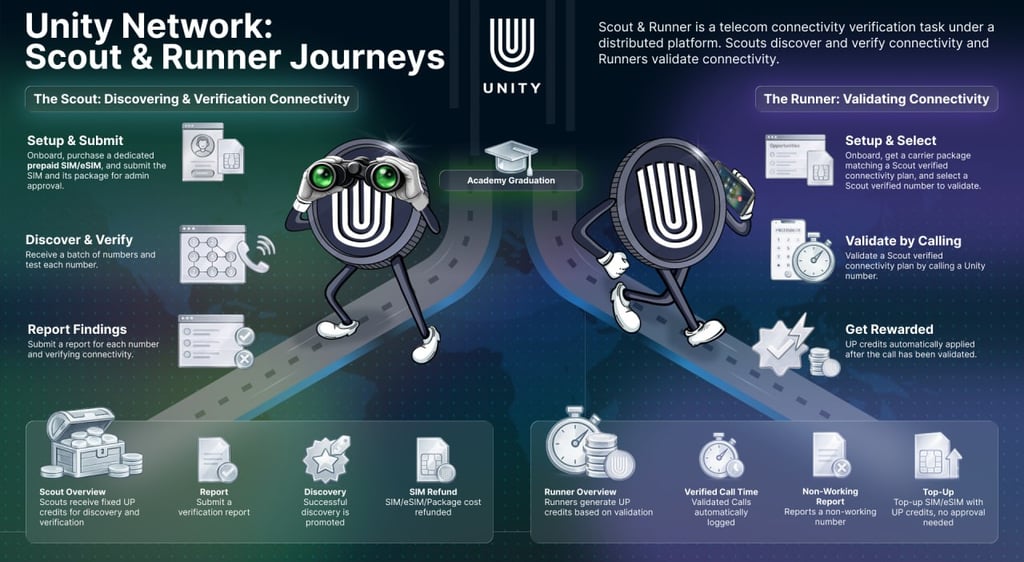
Connectivity Verification, commonly known as Scout & Runner, is an active community programme that helps Unetwork test and verify real-world telecommunications connectivity.
Unlike passive tasks that operate automatically in the background, Connectivity Verification requires participants to follow campaign instructions and use genuine mobile networks, approved SIMs or eSIMs and eligible call packages.
There are two roles:
📡 Scout — Sets up an approved SIM or eSIM and call package, tests supplied telephone numbers and reports the results.
🏃 Runner — Uses a matching carrier package to validate connectivity by calling a Unetwork number and completing the required verification.
Status: 🟢 Live Type: Opt-In Task
Why is it important?
Connectivity Verification helps Unetwork collect and verify real-world telecommunications data that cannot be gathered through automated systems alone.
The programme helps validate:
📞 International call routing
🌍 Mobile carrier connectivity
📡 Network coverage
☎️ International call plans
✅ Real-world telecommunications infrastructure
This verified information can support existing network services and help Unetwork develop future commercial telecommunications opportunities.
What do I need to do?
📡 Scout
Scouts obtain the SIM/eSIM and call package required for their assigned campaign. They receive numbers to test, make the required calls and submit an accurate report for each number and result.
🏃 Runner
Runners obtain a carrier package matching a Scout-verified connectivity plan. They then call a supplied Unetwork number so that the connection can be validated and recorded.
Requirements, call limits and objectives can vary between campaigns. Always follow the instructions shown inside the Unetwork app.
What affects my rewards?
Rewards and participation opportunities may depend on:
The campaign currently available.
Your assigned Scout or Runner role.
Correct completion of the required activities.
Accuracy and approval of submitted reports.
The number of eligible or successfully verified calls.
Your country, mobile network and call package.
Campaign-specific limits, objectives or bonuses.
📈 My Experience
The information below is based on my own experience operating Unetwork devices and participating in Connectivity Verification. Your results may differ depending on campaign availability and future reward changes.
🛰️ Scout
📈 Successfully approved international call plans have typically earned me around 5 UP per approved submission.
✔ Rewards are only issued once the submitted information has been reviewed and accepted.
🏃 Runner
📈 Runner campaigns usually allow a limited number of verification calls each day.
📈 Based on my experience, each successful verification call has typically earned between 0.10 and 0.20 UP.
⭐ Some campaigns may also include additional bonus rewards for completing specific objectives or successfully verifying particular destinations.
Overall
⭐ Connectivity Verification has been the highest-paying task I've personally participated in so far.
Unlike passive tasks, it requires active participation, but it has also provided some of the best earning opportunities currently available within the Unetwork ecosystem.
How to Opt In
Open the Tasks tab in the Unetwork app.
Select Connectivity Verification.
Review any Scout or Runner opportunities currently available in your country.
Apply for an available role and complete any required onboarding or Academy training.
If accepted, follow the campaign instructions carefully and complete the assigned activities.
Complete the tasks assigned to you and submit your results through the app.
Please note: Places may be limited, and not every role or campaign will be available in every country. Check the app regularly for new opportunities.
Important Notes
✔ Connectivity Verification is completely optional.
✔ Places for both Scout and Runner roles may be limited.
✔ Different countries may receive different campaigns.
✔ Rewards vary depending on the campaign.
✔ Always follow the task instructions carefully.
✔ Accuracy is more important than speed.
⭐ Pro Tips
Apply early—places are often limited, so check the app regularly for availability.
Read every instruction carefully before starting.
Take your time and submit accurate information.
Check the app regularly for new campaigns.
Participate whenever opportunities become available.
The more accurate your submissions, the greater your chance of successful validation.
Confirm that your SIM/eSIM and call package match the campaign requirements before spending money.
Keep evidence of any approved SIM or package costs where a refund is offered.
As Connectivity Verification continues to expand into more countries and telecom networks, New campaigns and earning opportunities may become available. Be sure to check the app regularly so you don't miss the next opportunity.
🚀 Future Tasks
Unetwork isn't stopping at these tasks.
The opportunities currently available represent only part of Unetwork’s wider vision.
Unetwork continues to develop its network capabilities and explore new ways for participating devices to contribute. As additional commercial services are introduced, existing operators may become eligible for new tasks without needing another lease code.
Unetwork’s long-term vision includes more than 20 passive and opt-in tasks, potentially creating additional ways for eligible operators to earn UP rewards over time.
Although nobody can predict exactly when new tasks will launch or how rewards will develop, the published roadmap shows the direction in which Unetwork intends to expand.
Ready to Start Earning?
Claim your free lease code today and begin participating in the growing Unetwork ecosystem.
Roadmap list
Wi-Fi tasks
SIM-based tasks
Hybrid Wi-Fi and SIM tasks
Desktop participation
Third-party enterprise tasks
Compute marketplace
Additional commercial services
More tasks could create more earning opportunities for eligible participants.
🌍 The Network Is Still Developing
Unetwork is still expanding, and task availability currently varies between countries, mobile networks and devices. Commercial services are expected to be introduced gradually, so rewards and opportunities may change over time.
⭐ My Advice to Operators
Keep your device online as consistently as possible.
Enable every task for which you are eligible.
Keep the Unetwork app updated.
Check regularly for new opt-in opportunities.
Be patient and approach participation with a long-term mindset.
Unetwork continues to develop, and additional tasks and commercial services may be introduced over time. Operators who keep their devices connected, follow current requirements and continue participating will be best placed to benefit from future opportunities—although task availability and rewards are never guaranteed.